
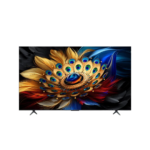
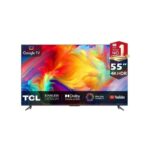

TCL 65C6K Premium QD-MiniLED TV
TCL 65C6K Premium QD-Mini LED TV Key Features
Type: Premium QD-Mini LED 4K Smart TV
Screen Size: 65 inches
Resolution: 4K Ultra HD (3840 × 2160)
Display Technology: QD-Mini LED (Quantum Dot + Mini LED backlight)
Panel Type: HVA high-contrast panel
Local Dimming: Full Array Local Dimming (hundreds of zones, model dependent)
HDR Support: Dolby Vision, HDR10+, HLG
Brightness: High peak brightness (up to ~2000 nits depending on mode)
Processor: AiPQ Pro Processor (AI picture optimization & upscaling)
Refresh Rate: 144Hz native refresh rate with VRR support
Gaming Features: HDMI 2.1, ALLM, VRR, AMD FreeSync Premium Pro, Game Master mode
Audio: ONKYO-tuned 2.1 channel system, Dolby Atmos, DTS Virtual:X
Smart OS: Google TV (built-in Google Assistant & Chromecast)
Connectivity: HDMI 2.1, USB, Bluetooth, Wi-Fi, Ethernet
Design: Slim bezel premium metal finish
Extras: MEMC motion smoothing, AI contrast optimization, multi-view support


TCL 65C6K Premium QD-MiniLED TV
TCL 65C6K Premium QD-MiniLED TV is a high-end 65-inch smart television designed to deliver ultra-precise brightness control, enhanced contrast, and cinematic picture quality using advanced QD-MiniLED display technology. It is built for users who want a powerful home entertainment experience with lifelike visuals, smooth motion, and intelligent smart features.
This TV solves a common issue found in standard 4K televisions: limited brightness control and washed-out dark scenes. With MiniLED precision dimming and quantum dot color technology, it produces deeper blacks, brighter highlights, and more accurate color reproduction for movies, sports, and gaming.
Table of Contents
- What is TCL 65C6K Premium QD-MiniLED TV?
- Key Specifications
- How Does QD-MiniLED Technology Work?
- Common Questions About TCL 65C6K TV
- Who Is This Product For?
- Installation & Setup
- Comparison & Value
- Warranty & Support
What is TCL 65C6K Premium QD-MiniLED TV?
The TCL 65C6K Premium QD-MiniLED TV is a next-generation 4K smart television that combines Quantum Dot (QLED) technology with MiniLED backlighting. This combination allows the TV to control light at a highly detailed level using hundreds of dimming zones.
It is designed for users who want premium picture quality without moving into ultra-expensive OLED categories. The TV improves contrast performance significantly compared to standard LED displays, making dark scenes more detailed and bright scenes more vibrant.
This model is ideal for living rooms, entertainment setups, and gaming environments where picture accuracy and brightness consistency are important.
Key Specifications
The TCL 65C6K is engineered for high-performance viewing, smooth motion handling, and advanced smart features.
| Feature | Specification |
|---|---|
| Display Size | 65 Inches |
| Resolution | 4K UHD (3840 × 2160) |
| Display Type | QD-MiniLED |
| Color Technology | Quantum Dot (QLED) |
| HDR Support | HDR10+, Dolby Vision |
| Backlight System | Precise Dimming MiniLED Zones |
| Refresh Rate | Up to 144Hz Native |
| Smart OS | Google TV |
| Audio System | Onkyo 2.1 Channel / Dolby Atmos |
| Processor | AiPQ Engine Pro |
| Connectivity | HDMI 2.1, USB, WiFi, Bluetooth |
| Gaming Features | FreeSync, Low Latency Mode |
This TV is compatible with modern gaming consoles, streaming platforms, and home theater systems.
How Does QD-MiniLED Technology Work?
MiniLED Precision Backlighting
MiniLED technology uses thousands of tiny LEDs behind the screen to control lighting in small zones. This allows the TV to adjust brightness more precisely across different parts of the screen.
As a result, dark areas stay deep and detailed while bright areas remain sharp and vivid without washing out the image.
Quantum Dot Color Layer
Quantum Dot technology enhances color purity by improving how light is filtered through nanoscale particles. This creates more accurate and saturated colors.
This means skin tones, landscapes, and HDR content appear more realistic and balanced across all scenes.
AiPQ Picture Processing
The AiPQ engine analyzes content in real time and adjusts contrast, sharpness, and motion clarity automatically.
This ensures smoother visuals when watching fast-moving content such as sports or gaming.
Local Dimming Control System
The local dimming system adjusts brightness zone by zone depending on the scene.
This reduces light bleeding and improves contrast between dark and bright areas of the image.
Common Questions About TCL 65C6K TV
Is this easy to install?
Yes, it can be installed on a TV stand or wall mount. Basic setup is straightforward after unboxing.
What devices does it support?
It supports gaming consoles, laptops, soundbars, streaming devices, and USB media through multiple ports.
Is it reliable for long-term use?
Yes, MiniLED backlighting and inverter-style processing improve durability and reduce panel stress.
Can I install it myself?
Basic setup is easy, but wall mounting should be handled carefully or done by a technician.
What surface does it require?
A stable TV stand or a VESA-compatible wall mount designed for 65-inch TVs.
Do I need professional help?
Not always, but professional installation is recommended for wall mounting and cable management.
How does it compare to standard 4K TVs?
It delivers significantly better contrast, brightness control, and color accuracy than standard LED TVs.
What do I need to get started?
You only need a power source, internet connection, and a content input like streaming apps or HDMI devices.
Who Is This Product For?
Movie Enthusiasts
Ideal for users who want cinematic visuals with deep contrast and vibrant colors.
Gamers
Perfect for low-latency gaming with high refresh rate support.
Families
Great for shared entertainment in living rooms with varied viewing angles.
Tech Enthusiasts
Suitable for users who want advanced display technologies in their home setup.
When this may NOT be necessary: If you only watch basic channels or have limited viewing needs, a standard LED TV may be more cost-effective.
Installation & Setup
Step 1: Positioning
Place the TV on a stable stand or mount it on a reinforced wall bracket.
Step 2: Power Connection
Connect to a stable power source with surge protection.
Step 3: Device Connection
Connect HDMI devices such as consoles or streaming boxes.
Step 4: Network Setup
Connect the TV to WiFi for smart features.
Step 5: Account Setup
Sign in to Google TV to access apps and services.
Tools needed: Screwdriver for wall mounting and HDMI cables.
DIY vs Professional: Stand setup is easy; wall mounting is best handled professionally.
Comparison & Value
| Feature | TCL 65C6K | Standard 4K TV | Basic LED TV |
|---|---|---|---|
| Display Type | QD-MiniLED | LED | LED |
| Contrast Control | Advanced Local Dimming | Basic | Limited |
| Brightness | High HDR Brightness | Medium | Low |
| Color Accuracy | Excellent | Moderate | Low |
| Gaming Performance | 144Hz + Low Latency | 60Hz | 60Hz |
The TCL 65C6K offers strong long-term value by combining premium display technology with energy-efficient performance.
Warranty & Support
The TCL 65C6K Premium QD-MiniLED TV includes a manufacturer warranty covering internal defects and display-related issues under normal usage.
Covered: Manufacturing faults, display issues, power system failure.
Not covered: Physical damage, mishandling, electrical surges, improper installation.
For warranty claims, users must provide proof of purchase and contact authorized TCL service centers.
Regular cleaning and proper ventilation help maintain long-term performance and display quality.
Reviews
There are no reviews yet.